
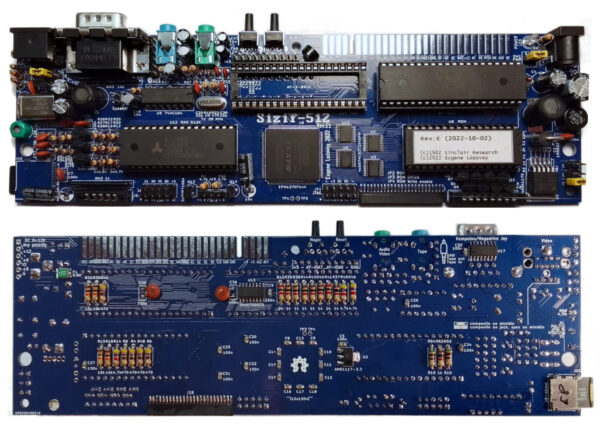
This is the Sizif-512 board on its own: assembled, initialised and tested, with an SD card carrying the esxDOS operating system and a set of demos so that you can prove it works the moment power reaches it. It is the same board that sits inside our ZX Neo. What you do with it afterwards is entirely your business, which is rather the point of buying it this way.
People take this route for one of two reasons. Either there is a case already — an original ZX Spectrum 48 shell that has outlived its electronics, or a replica bought separately — and it wants a working computer inside it. Or the build itself is the interesting part: choosing the case, cutting the openings, wiring the switch, deciding where the card slot should come out. We have done the part that is tedious and easy to get wrong, which is populating and testing the board. The part that is enjoyable is left for you.
What the board is
A Spectrum in hardware, not in software. There is a real Z80 on it and a real AY-3-8910, and the machine around them is built rather than simulated — so the demos that depend on exact hardware timing behave here as their authors intended.
- 512 kB RAM
- real, non-emulated Z80 processor
- real, non-emulated AY-3-8910 sound chip
- ZX EDGE CONNECTOR, for ZX Spectrum peripherals and memory
- STEREO SOUND jack — AY audio on its own
- TAPE IN / OUT jack — tape operations
- VIDEO jack — composite, RGB video and stereo audio
- joystick port to Kempston or Sinclair standard
- RESET button, and a MAGIC button that opens the hardware configuration menu
- processor clock raisable to 7 MHz, against the original 3.5 MHz
- ULAplus, a richer colour palette used by newer games and modern conversions
esxDOS, already on the card
The card that comes with the board is not blank. esxDOS gives the machine mass storage, a disc operating system and a file system all at once: programs in TAP, SNA, Z80, TRD and BASIC formats are copied onto the card from a PC and launched from a file browser. It extends BASIC with DOT-Commands, so utilities behave like new keywords, and it will freeze the whole state of the computer — mid-game, mid-experiment — and restore it later exactly as it was.
Loading the old way still works, of course. TAPE IN and TAPE OUT take a double-ended stereo mini-jack lead from a cassette recorder, or from a phone running an app such as ZX Tape Player, which plays a downloaded game back as audio. LOAD “” behaves as it always did.
What you can learn on it
A bare board is a better teacher than a finished computer, because nothing is hidden. The ZX EDGE CONNECTOR is the original bus, brought out where it always was, and from BASIC you address whatever hangs off it with OUT and IN — one line, ENTER, and something in the physical world moves. No toolchain, no drivers, no install.
There is more on the board for people who reach for a soldering iron: eight GPIO ports, a serial port at RS-232 with TTL signal levels, a connection point for a PS/2 keyboard, a connection point for a WiFi module, and provision to add a sound card and VGA and HDMI connectors. Above all there is a genuine Z80, which means genuine Z80 assembler — the same instructions, the same timings, the same contended memory the demo scene has been exploiting for forty years.
What comes with it, and what does not
You receive the assembled, initialised and tested board and the SD card with esxDOS and demos. Case, keyboard membrane and mat, power supply and video lead are chosen separately, which is the whole appeal of building it yourself. The board is laid out to go into a ZX Spectrum 48 replica case, though the case openings are cut for the original 1982 electronics — a Sizif-512 needs a few additional holes, and there is a template and step-by-step instructions for cutting them.
If you would rather skip all of that, the ZX Neo is this board already in its case, with everything around it.
Questions people ask
Is the board tested before it is sent?
Yes. Every board is assembled, initialised and tested by hand before it leaves the bench, and it ships with an SD card carrying esxDOS and demos so you can confirm it for yourself as soon as it has power and a screen.
What else do I need to turn this into a working computer?
A case with the right openings, a keyboard membrane and rubber mat, a 9 V power supply with a 5.5 / 2.1 mm centre-positive plug, a video lead to suit your television, and the television itself.
Will it fit an original ZX Spectrum 48 case?
It is designed to, but the case openings were cut for 1982 electronics and the Sizif-512 has sockets in places the original did not. You cut the additional holes yourself; we publish a template and instructions showing exactly where they go.
How much current does it draw?
The board on its own draws 250 mA, and 500 mA with a sound card attached. It is protected by a 750 mA polymer fuse. A 9 V, 1 A supply with a 5.5 / 2.1 mm centre-positive plug is the right thing to feed it — and if you hang expansion cards off the edge connector, count their consumption into the same budget.
Is this an emulator on a board?
No. The Z80 and the AY-3-8910 are real chips and the machine around them is built in hardware. That is why code written against the exact behaviour of the original — demos in particular — runs properly rather than nearly.
Can I plug in original ZX Spectrum peripherals?
The ZX EDGE CONNECTOR is there for exactly that, for peripherals and for memory. Switch the power off before you plug anything into it, and off again before you remove it; plugging into a live edge connector has ended a great many vintage machines.
The parts, old and new
Most of what is on this board was bought new. The memory is contemporary, and so is nearly everything around it — parts from current production rather than silicon lifted off a donor board. Those are the more predictable parts, and not because the originals were badly made: a part bought new has a short, documented history, while a chip pulled out of a donor has forty years of history that nobody wrote down.
Two devices we did not modernise, out of respect for what this machine descends from — the processor and the AY sound chip. The processor is a Zilog Z84C00 — Zilog’s CMOS Z80, still in production today, and the Z80 named everywhere else on this site: same instruction set, same pinout. It is a current part rather than one recovered from a donor, and that is rather the point. The device and the package are the ones a Spectrum used; the particular chip doing the work left the factory recently, which is why we trust it. Both sit in dual-in-line packages of the original kind: two rows of legs, the outline anyone who has had the lid off a Spectrum knows on sight.
And not everything in here is a chip of that era — we would rather say it than let you assume otherwise. The ULA logic is not an original ULA: it is re-implemented in an Altera EPM1270 CPLD, a current part doing that job in hardware. The processor and the AY are physical devices doing their own work, not software standing in for them. Everything else on the board is from current production. Those two are the same processor and the same sound chip a Spectrum used, in the same kind of package.
Platform credit. The Sizif-512 platform was designed by Eugene Lozovoy, known in the ZX community as UzixLS, and is published as open hardware under the MIT licence at github.com/UzixLS/zx-sizif-512 — © 2020 Eugene Lozovoy. MUMIO builds on that design and is not affiliated with the Sizif-512 project.
Reviews
There are no reviews yet.